Voicci
Pick your platform. Free 7-day trial, no signup - one shortcut, speak, paste clean text anywhere.
Recommended for your computer
 Mac
Mac
Macv2.75 · · DMG
Requires Mac with Apple Silicon (M1 or later) with macOS 15+
Download for Mac
.dmg · Notarized by Apple · SHA-256
Recommended for your computer
Windows
v2.75 · · EXE
Requires Windows 10 or 11 (64-bit)
Download for Windows
Recommended for your computer
Linux
v2.75 · · TAR.GZ
Requires a modern Linux desktop with Wayland or X11 · systemd · PipeWire/PulseAudio
Download for Linux
x86_64 & aarch64 · extract, then run ./install.sh · SHA-256
Windows will warn you before this installer runs. Here is what to click.
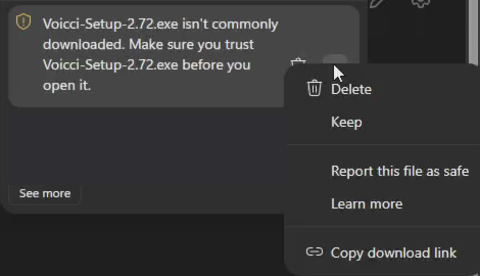
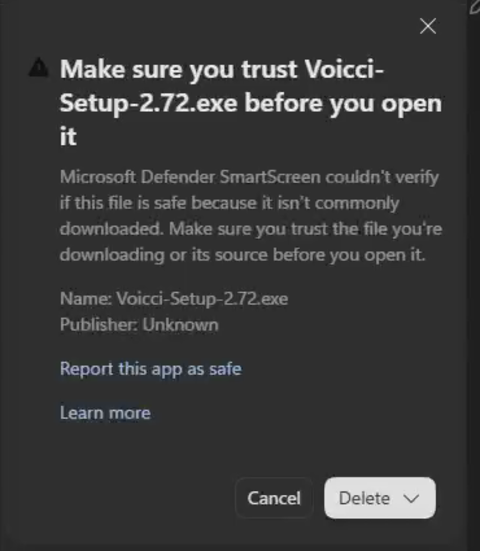
- In Edge the finished download says the file "isn't commonly downloaded": hover it, open the "…" menu and choose "Keep", then open the arrow next to "Delete" and choose "Keep anyway".
- If Windows then shows "Windows protected your PC", click "More info" and then "Run anyway".
Windows shows this for any new installer that few people have downloaded yet. The file is exactly what we published: compare its SHA-256 with the checksum link above if you want to be sure.
After installing:
press ⌥ Option + Space, speak, press again - your text appears where the cursor is.
← Back to voicci.com